The find feature searches a dive window for specified text, numbers, dates, or time periods.
There are multiple ways to search and find information in a dive window column. If no column is selected, the search is performed on the leftmost column.
You can also use the Console to search and find dimension values before a dive is performed.
The following commands open a Find dialog box:
- On the toolbar, click the Find icon
 .
. -
Before your first dive, do one of the following:
- If you are using NetDiver on a computer, point to a dimension on the Console, and then click the Find icon .
- If you are using NetDiver on a touchscreen device—such as an iPad—on the Console, tap a dimension once, and then tap the Find icon .
- If you are using NetDiver on a computer, point to a dimension on the Console, and then click the Find icon
The contents and options available in the Find dialog box vary, depending on the type of information in the selected column (text string, numbers, dates, time period).
You can also perform an Advanced Find for complex combinations of search criteria. For more information, see Advanced find.
 Finding a text string
If the data in the selected column is a text string, the Find tool opens the Find String in <column_name> dialog box.
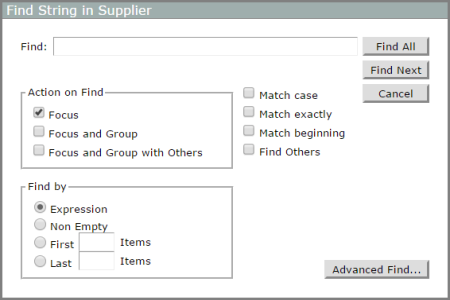
- In the Find box, enter a string of text that you want to search for.
-
In the Action on Find box:
-
Focus is selected by default. When the Find command runs, rows that contain the string that you are searching for are visible, and all other rows are hidden.
-
Optionally, select
NOTE: If the display is a MultiTab created from a classic model, Group options are not available.
When Focus and Group is selected, the columns that contain the search criteria are grouped. Their totals appear in a row called Group, on which you can dive.
When Focus and Group with Others is selected, the columns that contain the search criteria are grouped. Their totals appear in a row called Group, and an additional row called Others shows the totals for the columns that did not meet the search criteria. You can dive on Group and on Others.
-
-
In the Find by box:
- Select Expression to use the search criteria entered in the Find box.
- Select Non-Empty to hide rows that contain an empty cell in the selected column.
- Select First and enter a number (n) to view only the first n rows in the dive window.
- Select Last and enter a number (n) to view only the last n rows in the dive window.
NOTE: First n Items and Last n Items do not use any search criteria other than row position. These options are typically used after the column has been sorted.
- If you select
- Optionally, select Find others to find items that do not meet the specified criteria. Items that match the criteria indicated in the Find by box are hidden, and rows that do not meet the criteria are displayed.
- Click Find All.
Finding numbers
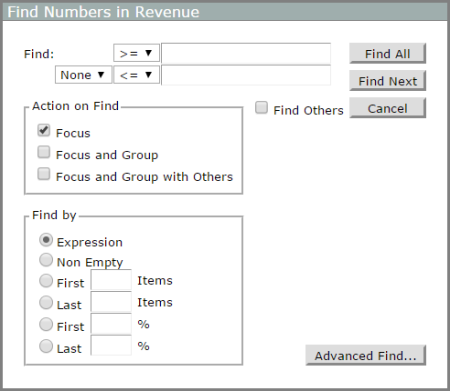
If the data in the selected column is numeric, the Find tool opens the Find Numbers in <column_name> dialog box.
-
In the Find box, enter a starting point and ending point of the number range that you want to search for.
- To the left of the number range numbers, select an arithmetic operator (>=, >, =, <, <=).
- To the left of the ending arithmetic operator, select a logical operator (None, And, Or).
-
In the Action on Find box:
-
Focus is selected by default. When the Find command runs, columns that contain the number range that you are searching for are selected, and all other rows are hidden.
-
Optionally, select
When Focus and Group is selected, the columns that contain the search criteria are grouped. Their totals appear in a row called Group, on which you can dive.
When Focus and Group with Others is selected, the columns that contain the search criteria are grouped. Their totals appear in a row called Group, and an additional row called Others shows the totals for the columns that did not meet the search criteria. You can dive on Group and on Others.
-
-
In the Find by box:
- Select Expression to use the search criteria entered in the Find box.
- Select Non-Empty to hide rows that contain an empty cell in the selected column.
- Select First n Items, and enter a number (n) to view only the first n rows in the dive window.
- Select Last n Items, and enter a number (n) to view only the last n rows in the dive window.
- Select First n %, and enter a number (n) to view rows accounting for n% of the column total starting with the first row.
- Select Last n %, and enter a number (n) to view rows accounting for n% of the column total starting with the last row.
NOTE: First n and Last n Items or % options do not use any search criteria other than row position. These options are typically used after the column has been sorted.
- Optionally, select Find others to find items that do not meet the specified criteria. Items that match the criteria indicated in the Find by box are hidden, and rows that do not meet the criteria are displayed.
- Click Find All.
Finding a date range
If the data in the selected column is dates, the Find tool opens the Find Date Range in <column_name> dialog box.
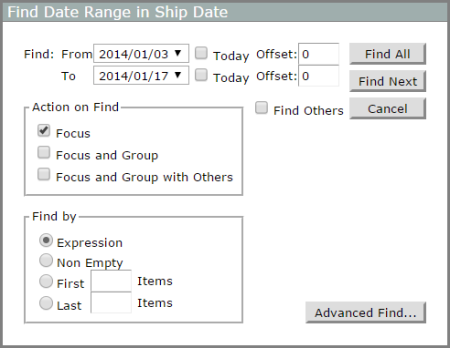
- You can search for a specific date or a range of dates.
- You can base your search on an offset of today's date.
- The Today check box uses the date on the client computer.
-
In the Find box, enter a single date or the range of dates that you want to search for.
Alternatively, select Today and enter an Offset value (for example, -1 to specify yesterday and today).
-
In the Action on Find box:
- Focus is selected by default. When the Find command runs, columns that contain the date or date range that you are searching for are selected, and all other rows are hidden.
-
Optionally, select
When Focus and Group is selected, the columns that contain the search criteria are grouped. Their totals appear in a row called Group, on which you can dive.
When Focus and Group with Others is selected, the columns that contain the search criteria are grouped. Their totals appear in a row called Group, and an additional row called Others shows the totals for the columns that did not meet the search criteria. You can dive on Group and on Others.
-
In the Find by box:
- Select Expression to use the search criteria entered in the Find section.
- Select Non-Empty to hide rows that contain an empty cell in the selected column.
- Select First and enter a number (n) to view only the first n rows in the dive window.
- Select Last and enter a number (n) to view only the first n rows in the dive window.
NOTE: First n Items and Last n Items do not use any search criteria other than row position. These options are typically used after the column has been sorted.
- Optionally, select Find others to find items that do not meet the specified criteria. Items that match the criteria indicated in the Find by box are hidden, and rows that do not meet the criteria are displayed.
- Click Find All.
Finding a time period
If the data in the selected column is a time period (such as Month or Quarter), the Find tool opens the Find Period Range in <column_name> dialog box.
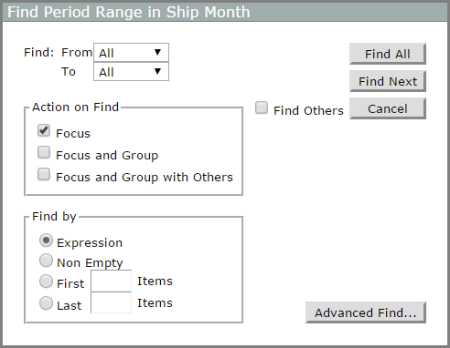
- In the Find box, select a period of time or range of time periods that you want to search for.
-
In the Action on Find box:
- Focus is selected by default. When the Find command runs, columns that contain the time period or time period range that you are searching for are selected, and all other rows are hidden.
-
Optionally, select
When Focus and Group is selected, the columns that contain the search criteria are grouped. Their totals appear in a row called Group, on which you can dive.
When Focus and Group with Others is selected, the columns that contain the search criteria are grouped. Their totals appear in a row called Group, and an additional row called Others shows the totals for the columns that did not meet the search criteria. You can dive on Group and on Others.
-
In the Find by box:
- Select Expression to use the search criteria entered in the Find box.
- Select Non-Empty to hide rows that contain an empty cell in the selected column.
- Select First and enter a number (n) to view only the first n rows in the dive window.
- Select Last and enter a number (n) to view only the first n rows in the dive window.
NOTE: First n Items and Last n Items do not use any search criteria other than row position. These options are typically used after the column has been sorted.
- Optionally, select Find others to find items that do not meet the specified criteria. Items that match the criteria indicated in the Find by box are hidden, and rows that do not meet the criteria are displayed.
- Click Find All.
Find before dive
You can search and find dimension values before performing a dive. This is an efficient way to reduce the amount of data that passes over the network, especially when working with very large dimensions.
NOTE: The Find dialog box that opens is similar to the dialog box that opens when you use the Find command to search a dive window column. However, you might notice some minor differences. For example, Focus is not optional.
To use Find Before Dive:
-
On the Console, do one of the following:
- If you are using a computer, point your cursor to the dimension that you want to search, and click the Find icon .
- If you are using a touchscreen device—such as an iPad—on the Console, tap the dimension you want to search only once, and then tap the Find icon next to it .
- If you are using a computer, point your cursor to the dimension that you want to search, and click the Find icon
- Enter the search criteria.
- Click Find All.
Advanced find
The Advanced Find option allows you to perform complex searches on an active dive window using combinations of search criteria on multiple columns. You can access the Advanced Find dialog box from any of the Find dialog boxes by clicking Advanced Find.
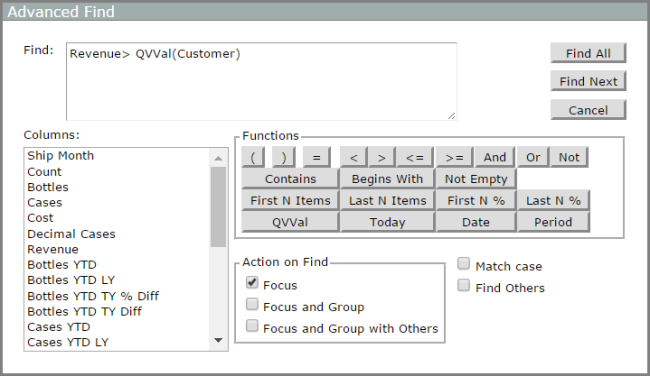
The Advanced Find dialog box has a Find box that contains the advanced find criteria. You can manually enter criteria in the Find box, or define the criteria by clicking column names and functions.
TIP: If you use the Functions buttons, NetDiver assists you with syntax.
A Columns box lists the column headers on the dive window, as well as additional column headers that were specified in your cBase or model. You can select columns that you want to include in the search criteria only if they are visible on the dive window.
The following advanced Functions are available:
- Brackets [ ]: Use to identify a column or dimension.
- QVVal: Use to specify a QuickView value.
- Syntax: ColumnName ArithmeticOperator QVVal(QV_Name) — Example: Units > QVVal(Threshold)
- In this example, NetDiver finds the Units values that are greater than the current value in the Threshold QuickView. For example, if the current value in the Threshold QuickView is 1000, NetDiver displays all values in the Units column that are greater than 1000 and omits the Units that do not meet this criteria.
The following Functions operate as described in the basic Find dialog boxes:
- Arithmetic operators: =, <, >, <=, >=
- Syntax: ColumnName operator n — Example: Quantity>=300
- Logical operators: And, Or, Not
- Alphabetic operators: Contains, Begins with
- Syntax: ColumnName operator "value" — Example: CustomerContact contains "Ann"
- Other operators: NotEmpty, First N Items, Last N Items, First N %, Last N %, Today, Date, Period
-
Syntax examples:
- Syntax: NotEmpty(ColumnName) — Example: NotEmpty(UnitsInStock)
- Syntax: Today(offset) — Example: Today(0)
- Syntax: ColumnName=Date (date) — Example: ShipDate=Date(2016/05/04)
- Date range example: OrderDate>=Date(2015/12/02) And OrderDate<Date(2016/05/02)
Watch the Video: Finding Text and Numbers.
Mentioned in: